

Wednesday, December 5, 2012
Quick, Easy Typing Practice

Friday, November 30, 2012
Choose Your Own Adventure!

The interesting thing about using a class wiki is that you can allow anyone to edit it. You could start a story and allow students to continue it one page at a time. There are a lot of possibilities with using a medium like this, and you can organize this process in a number of ways. If this is something that interests you, let me know, as I would love to help facilitate a project like this. Giving your students the opportunity to start small and understand how to properly publish to a wiki can evolve into a project that allows them to truly map out a creative story line that they can each collaborate and contribute to.
Wednesday, November 14, 2012
Edudemic...so good

Thursday, November 8, 2012
Google Lesson Plan Search

Wednesday, October 31, 2012
Project Based Learning...put simply

http://www.commoncraft.com/video/project-based-learning
Thursday, October 25, 2012
I'm Gonna Be The President

Flocabulary is a website that specializes in using hip-hop as a tool to learn content. They have certain free music videos that are free to view, including "The Week in Rap", which is a summary of the major news stories every week. Among the current videos that are available to view for free is "The Presidential Election". This song and video walk through the process of how a candidate becomes the President of the United States. Use it as a way to summarize the process, or have students list the steps of the presidential election that are discussed in the song. Either way, the song will probably get stuck in your head.

Friday, October 12, 2012
What is The Electoral College?
With the election coming up, Common Craft has posted this video: The Electoral College in Plain English. If you are not familiar with the in Plain English series of videos - it presents topics in a very easy to understand format for learners. This is a great introduction for students to the Electoral College. The embed code is available if you wanted to embed it into your own website.
Monday, October 1, 2012
Sneak that grammar in
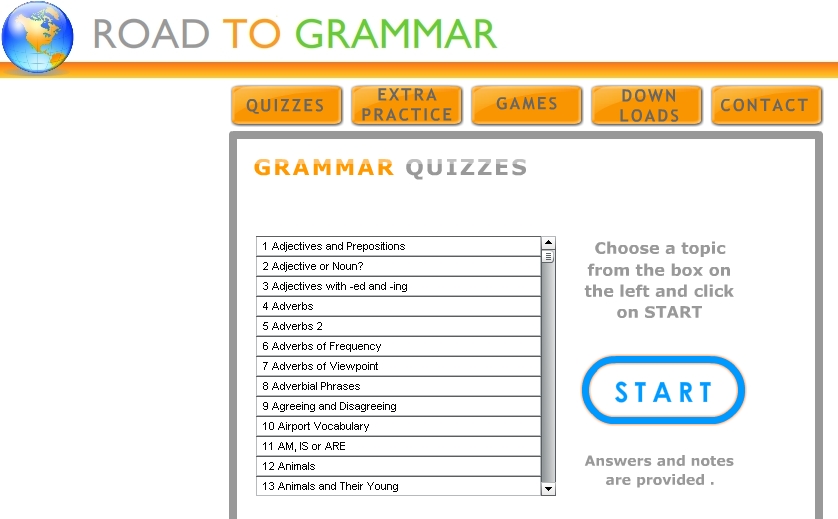
Grammar is the component of language arts that seems to get the least amount of time allowed for study. In understanding this, I would highly recommend that you check out Road to Grammar. It is a website that has pre-built quizzes on grammar topics that work great on the SMARTBoard. You can easily review some grammar concepts everyday by taking a view minutes during writing class to discuss and take a quick quiz.
There is a also a Road to Grammar Jr. portion for primary students. In addition to the quizzes, there are also some games that would be great SMARTBoard center activities. Check it out!

There is a also a Road to Grammar Jr. portion for primary students. In addition to the quizzes, there are also some games that would be great SMARTBoard center activities. Check it out!
Wednesday, September 26, 2012
Save Your Time...Stop Wasting it!
How many times have you looked at the clock and realized you just spent an hour on your computer when you meant to go check one thing? How long is the list of bookmarks that you have on your web browser? Do you have a regular routine of the daily websites that you check?
The reason for the above questions is because I think most people have a small handful of websites that they check daily and then others that they visit less frequently. Instead of checking these websites to see if they have new content (or missing good content because you didn't check) - you can easily subscribe to these websites to all be delivered to you in one place (amazing right?...I know).
This concept is referred to as RSS (really simple syndication), and as it states - it is really simple to use. Most people see the icons everywhere they go online, but probably never realized what they meant. Well, anytime you see an orange RSS icon, it simply means that you can subscribe to that website's content.
All you need is to sign up with an RSS reader in order to collect the content of all your favorite websites. This is the scary part that no one wants to commit to. But believe me when I say, there is no need to be afraid. In fact, anyone who already has a Google account, already has a reader, they just don't use it. Next time you sign into Google, click on the more button at the top right of your screen. When the menu drops down there will be a Reader link. Click on it, and you are in your RSS reader. All you need to do is tell it what websites you want it to collect content from. In order to do this, click on the big red SUBCRIBE button at the top left of the screen and type or paste the url address of a website you want to follow into the field and click ADD.
You will soon see that your Google Reader fills up with all the content from your favorite websites. Once you have done this - you will realize how much time this saves you. I have seriously tried to tell people about this for awhile now. I hope you take my advice. I think you will appreciate it.
If you own a smartphone or tablet, there are plenty of free rss readers available as apps that make it easy to keep up with your content on the go (I use feedler for my iPad and I would definitely recommend it).
The reason for the above questions is because I think most people have a small handful of websites that they check daily and then others that they visit less frequently. Instead of checking these websites to see if they have new content (or missing good content because you didn't check) - you can easily subscribe to these websites to all be delivered to you in one place (amazing right?...I know).
This concept is referred to as RSS (really simple syndication), and as it states - it is really simple to use. Most people see the icons everywhere they go online, but probably never realized what they meant. Well, anytime you see an orange RSS icon, it simply means that you can subscribe to that website's content.
All you need is to sign up with an RSS reader in order to collect the content of all your favorite websites. This is the scary part that no one wants to commit to. But believe me when I say, there is no need to be afraid. In fact, anyone who already has a Google account, already has a reader, they just don't use it. Next time you sign into Google, click on the more button at the top right of your screen. When the menu drops down there will be a Reader link. Click on it, and you are in your RSS reader. All you need to do is tell it what websites you want it to collect content from. In order to do this, click on the big red SUBCRIBE button at the top left of the screen and type or paste the url address of a website you want to follow into the field and click ADD.
You will soon see that your Google Reader fills up with all the content from your favorite websites. Once you have done this - you will realize how much time this saves you. I have seriously tried to tell people about this for awhile now. I hope you take my advice. I think you will appreciate it.
If you own a smartphone or tablet, there are plenty of free rss readers available as apps that make it easy to keep up with your content on the go (I use feedler for my iPad and I would definitely recommend it).
I'm still alive
Unfortunately, I have not been able to pay any attention to my poor blog so far this school year. That is going to change. As this is an easy way to share resources to the teachers I work with - I am not going to let this fade away. I know that consistency is the only way that a blog survives, and in that regard I hope that anyone who has regularly visited in the past will continue to do so. I would encourage you to share this link with other teachers in your building, and give me feedback if there are specific things that you would like to know more about. Most importantly, I would love to be able to better help visualize these technology tools in the classroom. If you would like to share what has worked, or what has failed - I would love to help to foster a conversation that revolves around practical classroom teaching with technology. Thanks for visiting,
Sean
Sean
Monday, July 30, 2012
Defining the Digital Classroom
Below I have posted the presentation that I used during today's session: Defining the Digital Classroom. Thanks for coming out!
Defining the Digital Classroom presentation
Edmodo tech tip
Google Reader tech tip
KidBlog tech tip
Defining the Digital Classroom presentation
Edmodo tech tip
Google Reader tech tip
KidBlog tech tip
Thursday, March 22, 2012
Quick Keyboarding Practice with TypingClub


Tuesday, March 13, 2012
Using Symbaloo to Share Bookmarks


I think this is a great way to keep your bookmarks organized, as well as online - so no matter what computer you are working on, you will always have access to them. What is also nice about symbaloo, is that you can make as many "mixes" as you want. So, for instance, you might have a mix for your language arts students to use which is different than the mix you have created for your social studies class. All you have to do is sign up for a free membership, and you can begin building your mixes. I would highly recommend downloading the Symbaloo bookmarker add-on that allows you to easily add any website you are on, without having to be on the symbaloo website. It will add two easy-to-use icons to your web browser toolbar.
If you use Mozilla Firefox, you can download it here
If you use Google Chrome, you can download it here
One last positive note about this is that you can search through many public "mixes" that teachers have already created to help you find new resources and ideas. You can really find some great websites that you didn't know about, I know that I have.
Thursday, February 23, 2012
Getting the (Power)Point Across
I think one thing that gets misunderstood often is the value of PowerPoint in the classroom. I think that too often PowerPoint is used in a way that does not play to its potential and, in turn, it is viewed as the problem - when the problem is actually the presenter. Here is a link to great presentation that was created to help focus on the 5 things that make PowerPoint presentations suffer (you can tell by the name that there is some humor involved). You Suck at PowerPoint!

Have you heard of YouTube? Is that even a question? Well...Slideshare.net is the YouTube of PowerPoint presentations. It is the largest online resource to share and download presentations. You can search for any topic and get great ideas for content and find related materials for your curriculum. Try it out - it is a great starting point for putting together a great slideshow. It is also a great way to share your presentations with other teachers or students. You can view any presentations without restrictions, and if you want to upload your own, you just need to sign up for a free account.
Continuing on the idea of making presentations more visual is theNounProject.com. The Noun Project is a website that is devoted to increase visual language by creating simple individual icons that represent specific words. The icons are all very simple and follow the same aesthetic, and you can easily browse the library by topic. Once you select an icon you can easily download a high-resolution copy of it for future use in presentations.


Have you heard of YouTube? Is that even a question? Well...Slideshare.net is the YouTube of PowerPoint presentations. It is the largest online resource to share and download presentations. You can search for any topic and get great ideas for content and find related materials for your curriculum. Try it out - it is a great starting point for putting together a great slideshow. It is also a great way to share your presentations with other teachers or students. You can view any presentations without restrictions, and if you want to upload your own, you just need to sign up for a free account.
Continuing on the idea of making presentations more visual is theNounProject.com. The Noun Project is a website that is devoted to increase visual language by creating simple individual icons that represent specific words. The icons are all very simple and follow the same aesthetic, and you can easily browse the library by topic. Once you select an icon you can easily download a high-resolution copy of it for future use in presentations.

Monday, January 23, 2012
Gaming in the Classroom
I remember my 5th grade teacher had a box of video game magazines in our classroom that she would let us read if we finished early with our work. It blew me away that she would allow us to do that, and it was a huge part of why I respected that teacher so much - because she respected the things that we valued, and allowed us time to explore them. This, of course, was before the internet or even computers in the classroom (besides a single apple IIe in the corner). But I think that if it was possible, this teacher would've welcomed the idea of using video game programming as a tool to tap into our interests to teach us valuable content.
Thinking about using video game programming as a way to integrate content area teaching is something most teachers get a little apprehensive about the second they hear the word "programming" involved. I completely understand the sentiment, and fortunately we live in an age as a teacher (most of the time) where if there is a will, there is a way. A good example of a teacher that took on this idea is Kevin Hodgson, a sixth-grade writing teacher, who put together this unit of video game programming incorporating elements of science content. He used Gamestar Mechanic as the program that was used to create the video games. For his purposes, Gamestar Mechanic seemed to be a great platform to guide the students through this process. Lucky for us, Kevin published every aspect of this project online with videos and handouts, as well as reflections to use as a resource.
This is definitely something to think about. I know that I got excited thinking about the possibilities of seeing this in some capacity at a 1:1 school. Even if it is just an after school club - it seems like there is too much interest on the part of students not to take advantage of this resource. If any teacher would like to take a shot at incorporating this idea in their classroom, I would definitely be happy to be involved in any way.
Thinking about using video game programming as a way to integrate content area teaching is something most teachers get a little apprehensive about the second they hear the word "programming" involved. I completely understand the sentiment, and fortunately we live in an age as a teacher (most of the time) where if there is a will, there is a way. A good example of a teacher that took on this idea is Kevin Hodgson, a sixth-grade writing teacher, who put together this unit of video game programming incorporating elements of science content. He used Gamestar Mechanic as the program that was used to create the video games. For his purposes, Gamestar Mechanic seemed to be a great platform to guide the students through this process. Lucky for us, Kevin published every aspect of this project online with videos and handouts, as well as reflections to use as a resource.
This is definitely something to think about. I know that I got excited thinking about the possibilities of seeing this in some capacity at a 1:1 school. Even if it is just an after school club - it seems like there is too much interest on the part of students not to take advantage of this resource. If any teacher would like to take a shot at incorporating this idea in their classroom, I would definitely be happy to be involved in any way.
Thursday, January 5, 2012
Happy New Year!
Today school is officially back in session, and I am ready to hit the ground running with some technology integration. During the break my life was officially changed forever with the introduction of an iPad to my household. At first, I felt like a sellout gushing over the device that I feel is a complete luxury item nowhere near the "need" column. On top of that, I would be happy to see Android devices that are much more reasonably priced prevail over the Apple Empire's "it" product. Okay, I might be getting a tad dramatic here, and I have experienced and appreciated Apple products before (my video iPod is still a device used daily) - but the iPad is something that truly tests your integrity as a technology user. Since it is such a costly item that is still fairly new - I didn't have a problem talking about what an expensive toy it is, because that is primarily how I see the device - a toy. And after using one for just about a week - I still feel as if it is a toy, but it is one of the most fun, well-designed toys I have ever had. It also makes me redefine my use of the word toy, because it integrates a web and multimedia experience in such a way that it makes things that seem tedious on my desktop PC fun and easy to do. This ease of use is something that Apple does so well, that I can't deny its effect on me as a consumer and as an educator. Being able to take a complicated device that will be used differently depending on the user, and creating an experience that is simple and natural despite the amount of knowledge that goes into every detail is amazing. Sounds a little like teaching, right? Well, it's something to think about.
Okay, now that I got that out of my system, I feel renewed and excited about the role technology has with our students. Along with the resources and links I provide, I welcome any opportunity to interact and work with your classroom to help foster a classroom that takes advantage of the technology that you have at our disposal. I know that there are sometimes barriers that prevent you from being able to achieve with technology what you would like to, and these can be a large range of things from devices working properly, student misuse/behavior, license restrictions, not enough training, web filter, etc. But looking at your goals, I would like to work with you and take steps to get your classroom to where you would like it to be. Please don't hesitate to ask for some assistance with incorporating technology into your instruction. The only question that is stupid is the one that isn't asked.
Okay, now that I got that out of my system, I feel renewed and excited about the role technology has with our students. Along with the resources and links I provide, I welcome any opportunity to interact and work with your classroom to help foster a classroom that takes advantage of the technology that you have at our disposal. I know that there are sometimes barriers that prevent you from being able to achieve with technology what you would like to, and these can be a large range of things from devices working properly, student misuse/behavior, license restrictions, not enough training, web filter, etc. But looking at your goals, I would like to work with you and take steps to get your classroom to where you would like it to be. Please don't hesitate to ask for some assistance with incorporating technology into your instruction. The only question that is stupid is the one that isn't asked.
Subscribe to:
Comments (Atom)